
文章内容
私有自定义指令传参
<template>
  <div id="app">
    <h1>Hello Vue Component</h1>
    <Left/>
  </div>
</template>

<script>
import Left from '@/components/Left.vue'

export default {
  components: {
    Left
  }
};
</script>
import Left from '@/components/Left.vue'
import Right from '@/components/Right.vue'

Vue.config.productionTip = false

Vue.component('MyLeft', Left)
Vue.component('MyRight',Right)
<script>

export default {
    // 组件的自定义属性,简单的方式
    // 可以在外面使用时,可以自定义设置,传输
    // props是一个数组
    // props: ['customInitValue'],

    // 如果要对自定义属性设置默认值,那么就需要用下面这种对象的方式进行定义
    props: {
        customInitValue: {
            // 设置自定义属性的默认值
            default: 0,
            // 设置自定义属性的类型
            type: Number,
            // 这个属性是必填项,自定义组件要传这个值
            required: true
        }
    },

    data() {
        return {
            count: 0,
            // 自定义属性是只读的,如果需要对自定义属性的值做修改,可以把它设置到data属性中
            customInitCount: this.customInitValue
        };
    },
};
</script>
//传递的是字符串属性
<Counter customInitValue="3"></Counter>
//使用v-bind:传递的是数字
<Counter :customInitValue="12"></Counter>
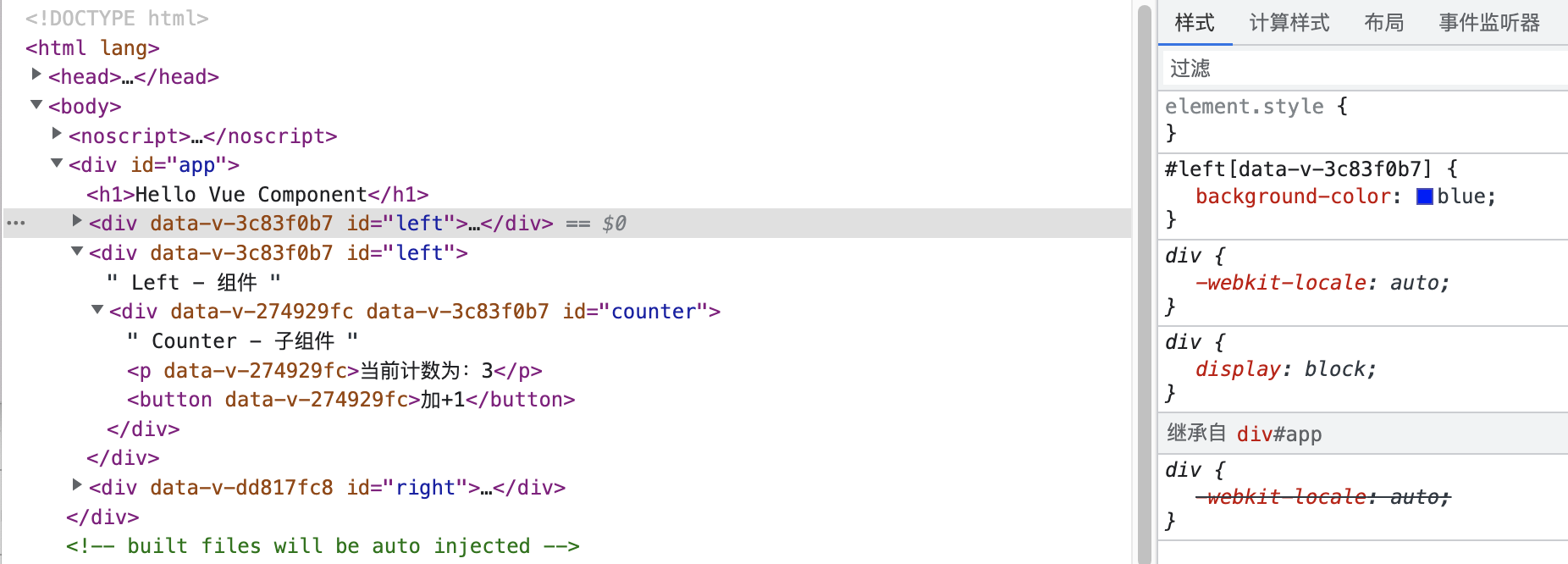
<style lang="less" scoped>
#counter {
    background-color: beige;
}
</style>
#right {
    background-color: brown;

    // 使用场景:项目UI中使用了第三方库的UI组件,开发中要自定义修改第三方库组件的样式,又不能直接拿第三库的源码修改,可以通过/deep/深层修改
    // 使用/deep/ p修饰的样式 编译器最终会转成[data-v-001] p{}父子选择器的形式
    /deep/ p {
        background-color: pink;
    }
}

</style>
Vue项目运行流程
vue-template-compiler
    <div id="left">
        Left - 组件
        <Counter v-bind:customInitValue="3"></Counter>
    </div>
</template>
<MyLeft></MyLeft>
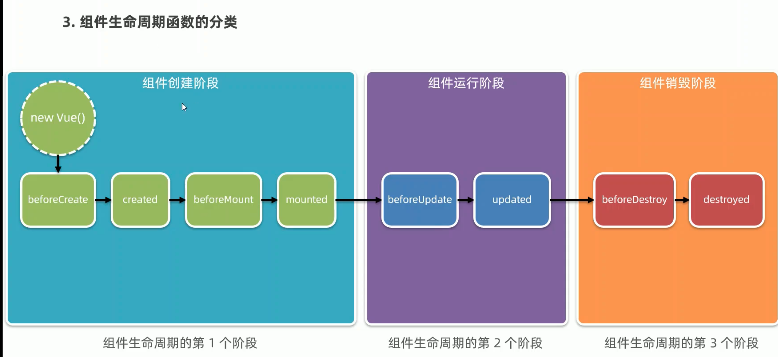
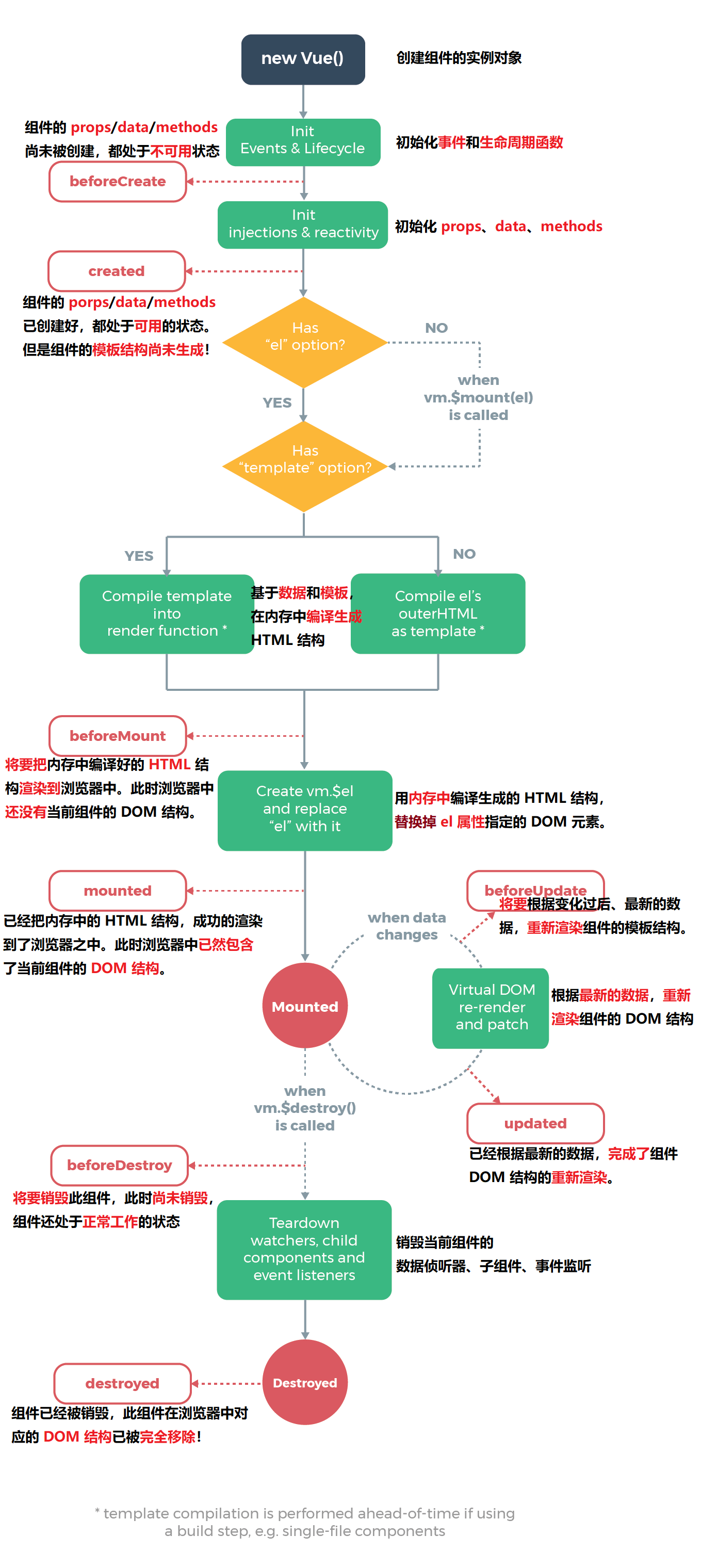
组件的生命周期
<template>
    <div>
        当前计数:{{count}}
        <button @click="increat">+1</button>
    </div>
</template>

<script>
export default {
    data() {
        return {
            count: 0
        };
    },
    methods: {
        increat() {
            this.count += 1
            this.$emit('numchanged', this.count)
        }
    },
};
</script>
父组件处理自定义事件
<Child @numchanged="handleChildChange"></Child>
兄弟组件EventBus通信
import Vue from 'vue'

export default new Vue()
    <div id="left">
        <button @click="sendMsg">发送好诗给Right组件</button>
    </div>
</template>
<script>
import bus from '../event/EventBus'
export default {
    components: {
        Counter
    },
    data() {
        return {
            message: '黑云压城城欲摧, 甲光向日金鳞开'
        };
    },
    methods: {
        sendMsg() {
            bus.$emit('sendMsg', this.message)
        }
    },
};
</script>
<template>
    <div id="right">
        Right 子组件 {{reciveMsg}}
    </div>
</template>

<script>
import bus from '../event/EventBus'

export default {
    data() {
        return {
            reciveMsg: ''
        };
    },
    created() {
        bus.$on('sendMsg', (val) => {
            this.reciveMsg = val
        })
    }

};
</script>
<template>
    <div>
        <h2>引用组件</h2>
        <hr>
        <p ref="pRef">鹅鹅鹅,曲项向天歌</p>
        <button @click="changeColor">点击变色</button>
    </div>
</template>

<script>
export default {
    methods: {
        changeColor() {
            console.log(this);
            this.$refs.pRef.style.color = 'red'
        }
    },
};
</script>
组件内部的子组件
<template>
  <div id="app">
    <h1>Hello Vue Component</h1>
    <h2>Child组件的计数为:{{supCount}}</h2>
    <button @click="resetZero">将计数重置为0</button>
    <hr>
    <input v-if="visibelInput" @blur="hideInput" ref="iptRef" type="text">
    <button v-else @click="showInput" >请输入文字</button>
    <hr>
    <!-- 3.使用组件 -->
    <Child ref="child" @numchanged="handleChildChange"></Child>
  </div>
</template>
this.$nextTick是实例对象中内置的方法,它的回调方法是在下一个回调周期开始时调用
methods: {
    handleChildChange(val) {
      console.log(val);
      this.supCount = val
    },
    resetZero() {
      console.log(this);
      this.$refs.child.count = 0
    },
    showInput() {
      this.visibelInput = true
      this.$nextTick(()=>{
        this.$refs.iptRef.focus()
      })
    },
    hideInput() {
      this.visibelInput = false
    }
  }
动态占位组件component
<component :is="comName"></component>
当同一个位置的组件被来回切换时,组件默认是在隐藏时销毁,出现时创建。如果想要保存上一次组件的操作状态,可以把component组件包到KeepAlive标签内,这样在组件切换时,只会进入后台处于失活状态,进入前台激活状态。
    <KeepAlive include="Left,Right">
      <component :is="comName"></component>
    </KeepAlive>
组件进入后台,前台时对应生命周期方法
export default {
    name: 'VueAdvancedComponentDeomLeft',
    data() {
        return {
            count: 0
        };
    },
    methods: {

    },
    created() {
        console.log('被创建',this);
    },
    destroyed() {
        console.log('被销毁',this);
    },
    deactivated() {
        console.log('被缓存,进入后台',this);
    },
    activated() {
        console.log('被激活,进入前台',this);
    }
};
组件的名称
export default {
  name: 'VueAdvancedComponentDeomApp',
  }
组件的注册名称,用于组件开发时用
<script>
import Left from '@/components/Left/Left.vue'
import Right from '@/components/Right/Right.vue'

export default {
  name: 'VueAdvancedComponentDeomApp',
  components: {
    Left,
    Right
  },
slot插槽
<template>
    <div class="container">
        插槽Left组件
        <hr>
        <!-- 没有设置name的插槽叫默认插槽, 在组件中没有指定v-slot:name的插槽内容默认会放置到默认插槽中 -->
        <slot>

        </slot>
        <hr>
        <!-- 设置了name的插槽叫做具名插槽 -->
        <slot name="second">
            <h6>插槽后备内容second:当外部没有给这个插槽设置值时,会展示默认展示这块</h6>
        </slot>
        <slot name="third">
            <h6>插槽后备内容third:当外部没有给这个插槽设置值时,会展示默认展示这块</h6>
        </slot>
    </div>
</template>
插槽组件的使用
   <SlotLeft>
      <!-- slot定义时有一个name属性,如果不设置默认叫default -->
      <!-- 在外部使用这个标签时,可以选择将插槽内容根据v-slot:name放到那个slot定义中 -->
      <!-- v-slot:name使用时,外面要使用template虚拟组件进行包裹,template虚拟组件并没有真实的内容 -->
      <template v-slot:second>
        <p>second插槽组件子内容</p>
      </template>

      <!-- v-slot:标志的简写是# -->
      <template #third>

      </template>

      <p>默认添加到默认插槽位置中</p>

    </SlotLeft>
如果插槽中既包含名称,又包含了属性,那么这个插槽叫作用域插槽
<template>
    <div class="article-container">
        <slot name="body" msg="hello vue.js" :user="userInfo">
            文章的内容
        </slot>
    </div>
</template>

<script>
export default {
    data() {
        return {
            userInfo: {
                name: 'Jack',
                age: 30
            }
        };
    },
};
</script>
接收插槽传递过来的对象:v-slot:body="scope"
 <Article>
      <template v-slot:body="scope">
        <p>桃花潭水深千尺, 不及汪伦送我情</p>
        <p>{{ scope }}</p>
      </template>
    </Article>
<template>
    <div class="article-container">
        <p v-color>文章描述</p>
        <p v-color="'blue'">私有自定义指令传参</p>
    </div>
</template>


<script>
export default {
    // 私有自定义指令
    directives: {
       // color: {
        //     // 当指令第一次被绑定到元素上面时,会执行bind函数, 其他都不再调用
        //     // binding是私有自定义指令的传参
        //     bind(el, binding) {
        //         console.log(el);
        //         el.style.color = 'red'

        //         console.log(binding);
        //         el.style.color = binding.value
        //     },
        //     // Dom每次更新的时候调用
        //     update(el, binding) {
        //         console.log(el);
        //         el.style.color = 'red'

        //         console.log(binding);
        //         el.style.color = binding.value
        //     }
        // }


        // 如果自定义指令中的bind方法和update方法的实现一样,那么可以使用color: function(){}形式,统一实现。
        color(el, bingding) {
            console.log(el);
            el.style.color = 'red'

            console.log(binding);
            el.style.color = binding.value
        }
    }
};
</script>
全局自定义指令
Vue.directive('color', {
  bind(el, binding) {
    el.style.color = binding.value
  },
  update(el, binding) {
    el.style.color = binding.value
  }
})

Vue.directive('color', (el, binding) {
  el.style.color = binding.value
})