
# App项目的Podfile文件
target 'StaticFramework' do
# Comment the next line if you don't want to use dynamic frameworks
    use_frameworks!
    # Pods for StaticFramework
    pod 'FMDB'
end


# SDK项目的Podfile文件
target 'StaticFramework' do
# Comment the next line if you don't want to use dynamic frameworks
    use_frameworks!
    # Pods for StaticFramework
    pod 'FMDB'
end

post_install do |installer|
    installer.pods_project.targets.each do |target|
        target.build_configurations.each do |config|
            config.build_settings['ENABLE_BITCODE'] = 'NO'
        end
    end
end
Dead Code Stripping 设置为NO,完全包含framework里的代码,拒绝剪裁,修改。
Link With Standard Libraries 设置为关闭,避免重复链接
#Build Active Architecture only 设置为Yes, 使其编译时只生成当前机器的架构。
Other Linker Flags选项设置为-ObjC
-ObjC: 强制加载所有用Objective-C类和分类实现的目标文件
-all_load: 强制加载所有的目标文件
-force_load[path]: 强制加载[path]指定路径的静态库中的所有目标文件
-l[xxx]: 告诉链接器,在搜索路径下查找lib[xxx].dylib 或 lib[xxx].a
-framework [xxx]: 告诉链接器在framework搜索路径下,查找`xxx.framework/xxx'
-F[dir]: 在frameworks搜索路径下追加一个目录[dir]
-Xlinker: 传递给链接器的其他选项,例如-Xlinker -rpath @executable_path/Frameworks/。
5.framework合并
lipo -create xxxx/ProjectName.framework/ProjcetName xxxx/ProjectName.framework/ProjcetName -output xxxx/ProjectName.framework
lipo -create \
~/Library/Developer/Xcode/DerivedData/StaticFramework-cjzeucukluzhhscxruhakzuohbtp/Build/Products/Debug-iphoneos/StaticFramework.framework/StaticFramework \
~/Library/Developer/Xcode/DerivedData/StaticFramework-cjzeucukluzhhscxruhakzuohbtp/Build/Products/Debug-iphonesimulator/StaticFramework.framework/StaticFramework \
~/Library/Developer/Xcode/DerivedData/StaticFramework-cjzeucukluzhhscxruhakzuohbtp/Build/Products/Release-iphoneos/StaticFramework.framework/StaticFramework \
~/Library/Developer/Xcode/DerivedData/StaticFramework-cjzeucukluzhhscxruhakzuohbtp/Build/Products/Release-iphonesimulator/StaticFramework.framework/StaticFramework \
-output ~/Desktop/app/StaticFramework.framework
设置Base SDK 为 iOS,
设置COMBINE_HIDPI_IMAGES为NO,否则Bundle中的图片会变成tiff格式,
设置Skip install为YES,
删除Installation Directory对应的值
lipo -create XXX/模拟器.a路径 XXX/真机.a路径 -output 合并后的文件名称.a
lipo -create \
~/Library/Developer/Xcode/DerivedData/StaticLib-hhthxcjblbfkvzcguwyduhlkkvei/Build/Products/Debug-iphoneos/libStaticLib.a \
~/Library/Developer/Xcode/DerivedData/StaticLib-hhthxcjblbfkvzcguwyduhlkkvei/Build/Products/Debug-iphonesimulator/libStaticLib.a \
-output ~/Desktop/app/libStaticLib.a
# Type a script or drag a script file from your workspace to insert its path.
if [ "${ACTION}" = "build" ]
then
    INSTALL_DIR=${SRCROOT}/Products/${PROJECT_NAME}.framework

    DEVICE_DIR=${BUILD_ROOT}/${CONFIGURATION}-iphoneos/${PROJECT_NAME}.framework

    SIMULATOR_DIR=${BUILD_ROOT}/${CONFIGURATION}-iphonesimulator/${PROJECT_NAME}.framework

    # 如果真机包或模拟包不存在,则退出合并
    if [ ! -d "${DEVICE_DIR}" ] || [ ! -d "${SIMULATOR_DIR}" ]
    then
        exit 0
    fi

    # 如果合并包已经存在,则替换
    if [ -d "${INSTALL_DIR}" ]
    then
        rm -rf "${INSTALL_DIR}"
    fi

    mkdir -p "${INSTALL_DIR}"

    cp -R "${DEVICE_DIR}/" "${INSTALL_DIR}/"

    # 使用lipo命令将其合并成一个通用framework
    # 最后将生成的通用framework放置在工程根目录下新建的Products目录下
    lipo -create "${DEVICE_DIR}/${PROJECT_NAME}" "${SIMULATOR_DIR}/${PROJECT_NAME}" -output "${INSTALL_DIR}/${PROJECT_NAME}"

    #合并完成后打开目录
    open "${SRCROOT}/Products"

fi
# 取得项目名字(get project name)
FMK_NAME=${PROJECT_NAME}
# 取得生成的静态库文件路径 (get framework path)
INSTALL_DIR=${SRCROOT}/Products/${FMK_NAME}.framework
# 设置真机和模拟器生成的静态库路径 (set devcie framework and simulator framework path)
WRK_DIR=${BUILD_ROOT}
DEVICE_DIR=${WRK_DIR}/Release-iphoneos/${FMK_NAME}.framework
SIMULATOR_DIR=${WRK_DIR}/Release-iphonesimulator/${FMK_NAME}.framework
# 模拟器和真机编译 (device and simulator build)
xcodebuild -configuration "Release" -target "${FMK_NAME}" -sdk iphoneos clean build
xcodebuild -configuration "Release" -target "${FMK_NAME}" -sdk iphonesimulator clean build
# 删除临时文件 (delete temp file)
if [ -d "${INSTALL_DIR}" ]
then
rm -rf "${INSTALL_DIR}"
fi
mkdir -p "${INSTALL_DIR}"
# 拷贝真机framework文件到生成路径下 (copy device file to product path)
cp -R "${DEVICE_DIR}/" "${INSTALL_DIR}/"
# 合并生成,替换真机framework里面的二进制文件,并且打开 (merger and open)
lipo -create "${DEVICE_DIR}/${FMK_NAME}" "${SIMULATOR_DIR}/${FMK_NAME}" -output "${INSTALL_DIR}/${FMK_NAME}"
echo "${DEVICE_DIR}/${FMK_NAME}"
echo "${SIMULATOR_DIR}/${FMK_NAME}"
rm -rf "${WRK_DIR}"
echo "${INSTALL_DIR}"
/usr/bin/lipo: Release-iphoneos/libGPUImage.a and Release-iphonesimulator/libGPUImage.a have the same architectures (arm64) and can't be in the same fat output file
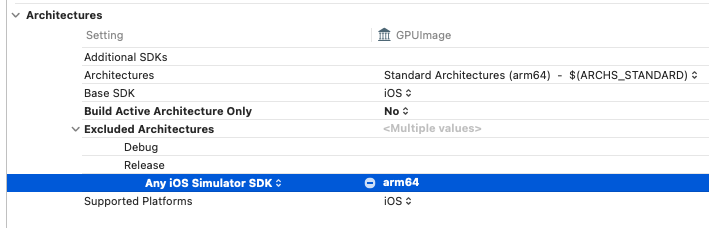
lipo XXX.a -remove arm64 -output XXX.a
file GPUImage.framework/GPUImage
current ar archive:说明是静态库,选择Do not embed
Mach-0 dynamically:说明是动态库,选择Embed
codesign -dv GPUImage.framwork